How Restaurant Owners Can Save 10+ Hours Every Week with AI
Where restaurant owners lose hours each week — and which AI-assisted workflows (reviews, social, scheduling, comms) help independent operators save time without hype.
- Published
- 2026-07-20
- Last Updated
- 2026-07-20
Quick Answer
Independent restaurant owners are short on time because admin work expands to fill every gap between service. AI does not run your restaurant. Used well, it can help reclaim admin hours on repetitive writing, sorting, and first-draft work — reviews, social captions, schedule drafts, supplier emails, training outlines, and weekly reports — while you keep hospitality, food quality, and final decisions.
A realistic weekly save (often framed as “10+ hours” in this series) comes from a time audit + human-in-the-loop workflow, not from buying an “AI restaurant agent.” Results vary by concept, staffing, and discipline. Treat the number as a target for reclaimable admin time — never a guaranteed outcome.
A working system covers:
- A honest weekly time map of where owner hours actually go
- A short list of tasks that are safe to draft with AI (and a longer list that are not)
- One human review loop before anything guest-facing goes live
- A 30-day adoption roadmap that starts small and stays vendor-neutral
- Links back to ops readiness — restaurant operations and restaurant SOP — so marketing automation does not outrun the floor
This is Episode 1 of AI for Restaurant Owners. Return to the series hub for the full spine. For discovery time already spent on Maps and posts, pair this guide with Google Business Profile for restaurants and the sequencing in restaurant digital transformation.
⚠️ Editorial promise, not a warranty. “Save 10+ hours” assumes you cut low-value admin loops and keep humans on guest-facing judgment. WhateverAsk publishes trusted operator playbooks — not AI-generated filler and not SaaS demos (WHA-373).
Why Restaurant Owners Are Always Short on Time
Owners rarely lose a week to one dramatic crisis. They lose it in fifteen-minute fragments: a review that needs a calm reply, a menu price change that must hit three channels, a no-show that reshuffles the line, a supplier who needs confirmation before noon, a social post that “should take five minutes,” and a manager chat that turns into policy-by-emoji.
That pattern is why “AI for restaurant owners” search interest is rising — and why thin “best AI tools” listicles fail operators. The real job is not to collect tools. It is to protect owner attention for decisions only an owner can make.
The hidden calendar
Most independents already run three jobs:
| Job | What it looks like | Why it expands |
|---|---|---|
| Operator | Service, quality, staffing coverage | Guests and tickets do not wait |
| Administrator | Schedules, suppliers, reports, compliance paperwork | Systems are incomplete, so the owner becomes the system |
| Marketer | Reviews, GBP, social, offers, neighborhood reputation | Platforms reward freshness; silence looks like decline |
When ops docs are thin, the owner becomes the living SOP. When discovery channels are unfinished, the owner becomes the marketing department. AI helps most when it compresses admin and draft work — not when it pretends to replace leadership.
Why “work harder” fails
Adding more personal hours does not scale. A second location, a catering spike, or a weak week of covers all demand the same owner brain. The leverage move is to standardize and draft-assist the repetitive layer so service-week energy goes to hospitality and food.
If the floor still runs on heroics, fix that first with restaurant operations. AI on top of chaos produces faster chaos.
The Biggest Time-Consuming Tasks
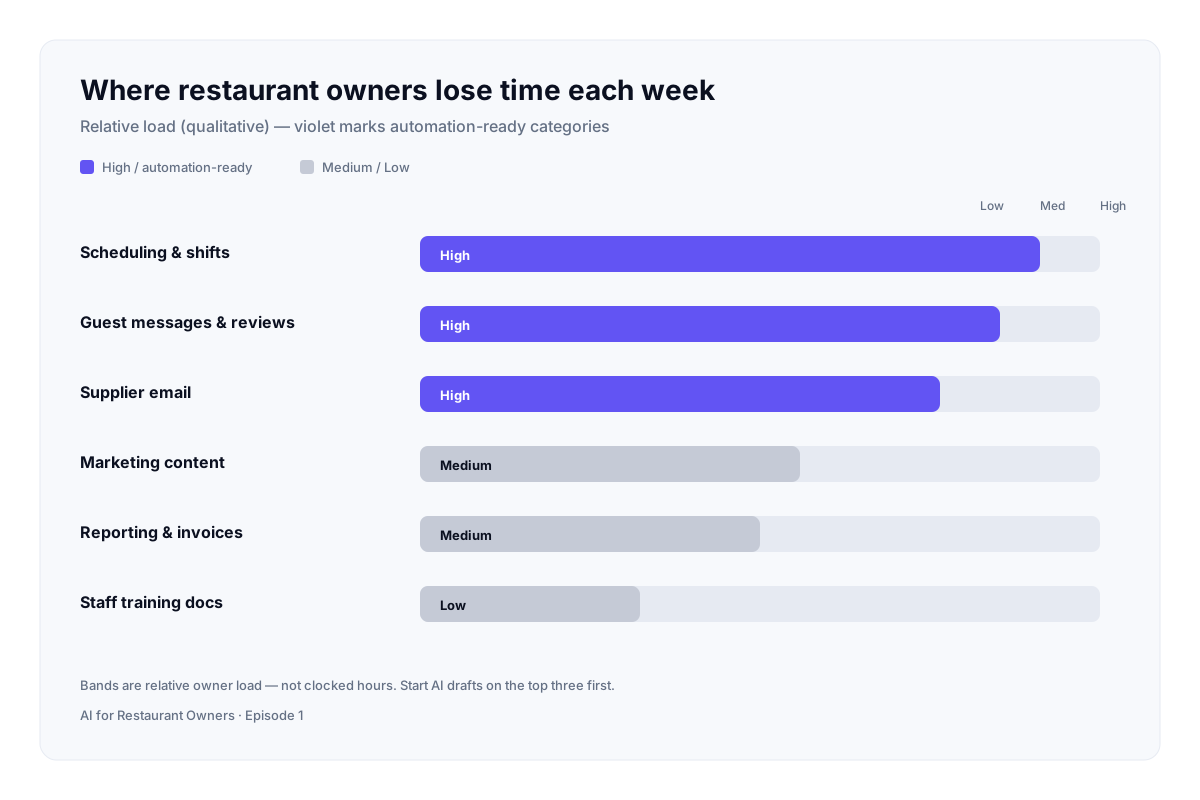
Before you adopt any tool, spend one calm hour mapping last week. Owners who skip the audit buy software for problems they do not have and ignore the hours they actually waste.
Typical weekly time sinks (independent / single-location)
| Task cluster | What burns time | Reclaimable with AI drafts? |
|---|---|---|
| Review replies & guest messages | Tone, facts, offline handoff | High — draft only; human sends |
| Social / content captions | Blank-page friction, consistency | High — batch drafts; human edits |
| Google Business Profile posts & Q&A | Freshness + accuracy | High if facts are checked (GBP guide) |
| Scheduling & shift notes | Coverage puzzles, reminder text | Medium — draft options; manager owns labor law / fairness |
| Supplier & admin email | Repetitive confirmations | Medium — templates + AI polish |
| Menu copy / promo blurbs | Rewrites across channels | Medium — never invent allergens or prices |
| Training outlines | New-hire onboarding packs | Medium — base on your real SOP |
| Weekly reporting | Pulling numbers into narrative | Medium — summarize; do not invent KPIs |
| Inventory / 86 decisions | Physical counts, judgment | Low — AI cannot see your walk-in |
| Hiring interviews & culture | Trust and fit | Low — humans only |
| Food quality & plating standards | Taste and consistency | None — hospitality core |
How to run a 60-minute time audit
- List every owner task from the last seven days in 15-minute blocks.
- Tag each as guest-facing judgment, ops decision, or repetitive draft/admin.
- Circle only the third bucket for AI experiments.
- Estimate hours per circled item. That sum is your realistic ceiling — often where the “10+ hours” editorial target comes from when admin is heavy.
- Pick two circled tasks for week one. Not eight.
Owners who try to automate everything in a weekend abandon the stack by Friday. Start narrow.
For local discovery work that already consumes owner nights, deepen local SEO for restaurants after GBP basics are stable — do not let AI captions outrun accurate NAP and hours.
Which Tasks AI Can Actually Help With Today
Treat AI as a junior assistant that never clocks in on the floor. It drafts, sorts, and proposes. You approve.
High-fit use cases (2026 operator reality)
- Review response drafts — Paste the review (remove personal data if needed). Ask for a calm, specific reply that acknowledges the visit, avoids legal admissions you did not authorize, and offers an offline path for complaints.
- Social and GBP caption batches — Provide 5 real dish photos or weekly specials; get 5 caption options in your voice; edit before publish.
- Shift reminder and lineup notes — Turn a rough coverage plan into clear staff messages (manager still owns fairness and compliance).
- Supplier email polish — Convert bullet notes into professional confirmations.
- Training outlines — Expand your SOP bullets into a first-week training agenda (must match your written procedures).
- Weekly owner memo — Summarize notes you already trust into a one-page narrative for partners or GMs.
- Guest FAQ drafts — Parking, allergens *at a policy level*, hours, reservation rules — then verify every fact.
- Competitor / neighborhood research digests — Summarize public pages you provide; do not trust invented “market data.”
Medium-fit (use with tighter guardrails)
| Use case | Guardrail |
|---|---|
| Menu description rewrites | Lock prices, allergens, and portion claims to source-of-truth menu |
| Promo ideas | No invented discounts; finance/owner approves offers |
| Schedule optimization suggestions | Labor rules, minors, and fairness stay human |
| Complaint triage labels | Never auto-send; escalate sensitive cases |
What “AI restaurant management” is not
AI is not a replacement for your POS, inventory truth, or payroll system. Integrated ops platforms may add AI features later — Episode 1 stays vendor-neutral on general assistants vs locked-in stacks. Digitize sequence first via digital transformation; then add assistants where draft work piles up.
What AI Cannot Replace
This section is the trust spine of the series. Skip it and you sound like a product landing page.
Non-negotiable human work
- Hospitality — tone at the door, recovery after a mistake, reading a table
- Food quality — taste, consistency, sourcing judgment
- Leadership — hiring, firing, coaching, culture
- Safety & compliance — allergens as served, hygiene, labor decisions
- Brand promises — what you will stand behind in public
The human-in-the-loop rule
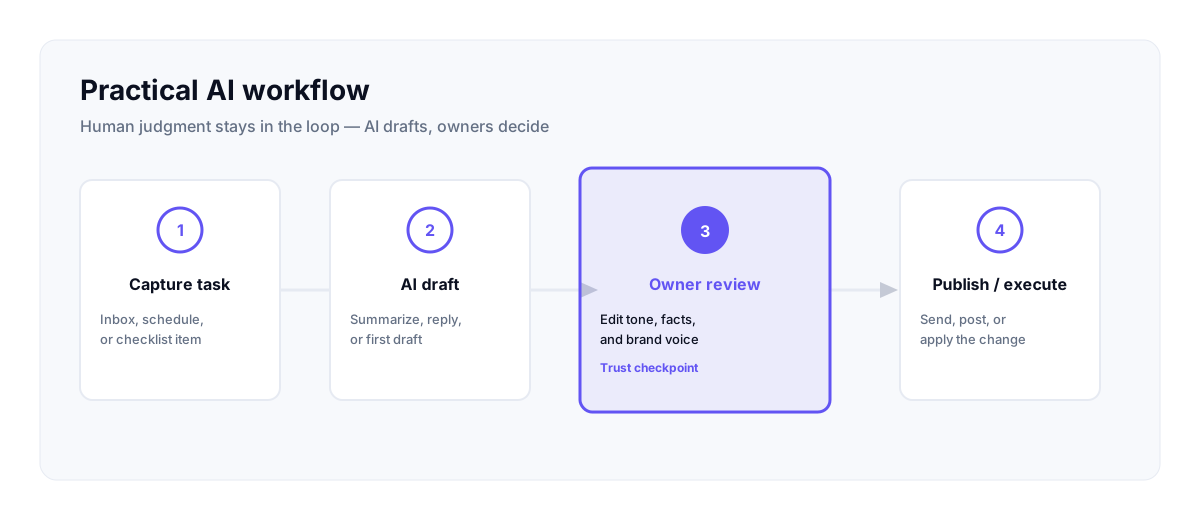
Every guest-facing output follows four steps:
- Brief — facts, voice, constraints (what must / must not say)
- Draft — AI produces options
- Edit — owner or trained manager revises
- Publish / send — human clicks send
If step 3 is skipped, you will eventually publish a confident wrong hour, a wrong allergen note, or a tone-deaf apology. That costs more than the hours you “saved.”
WhateverAsk’s public positioning is a trusted editorial knowledge platform. AI may assist research and drafting internally; published pages and your guest communications still need human review. Apply the same standard inside your restaurant.
Practical Weekly AI Workflow
Use this as a recurring rhythm, not a one-time experiment.
Sunday or Monday — 45 minutes (owner)
- Review last week’s time map (or update it).
- Choose two admin tasks for AI assist this week.
- Gather source facts (hours, specials, policy lines, SOP bullets).
- Store prompts you reuse in a single note (not scattered chats).
Mid-week — 20–30 minutes (owner or GM)
- Batch review replies and social captions.
- Run the four-step loop; schedule posts only after edit.
- Flag anything that needs ops truth (86 list, price change) before marketing goes live.
Friday — 15 minutes (owner)
- Score the week: hours actually reclaimed vs drama created.
- Keep, cut, or tighten each AI use case.
- Note one prompt improvement for next week.
Prompt pattern that works for restaurants
Context: Independent [cuisine] restaurant in [neighborhood]. Voice: warm, plain, no hype.
Task: Draft [review reply / 3 GBP posts / schedule reminder].
Hard facts (do not invent): [paste hours, prices, policies].
Constraints: No medical claims. No guaranteed wait times. Offer offline contact for complaints.
Output: 3 options. Mark anything that needs a human fact-check.
Weekly checklist (print or pin)
- [ ] Two AI-assisted tasks only (until stable)
- [ ] Facts pasted from source of truth — not from memory
- [ ] Human edit before every guest-facing send
- [ ] GBP hours/menu still match reality (GBP playbook)
- [ ] No new tool purchases this week unless last week’s loop already works
For customer-growth time you still spend after admin shrinks, use how restaurants can get more customers — Episode 1 does not replace that acquisition system.
Recommended AI Tools (When to Use Each)
Vendor-neutral categories — not an affiliate ranking. Names change; jobs stay.
| Job | Good-enough starting point | When to consider a specialized tool |
|---|---|---|
| General drafting (reviews, emails, memos) | ChatGPT / Claude / Gemini-class assistants | You need team seats, shared prompt libraries, or stricter admin controls |
| Research digests from sources you provide | Perplexity-class research assistants | You already have a research workflow and need citations you will verify |
| Internal notes → study guides | NotebookLM-class notebook tools | You have long SOP / training PDFs to query — still verify answers |
| Design variants for posts | Canva AI-class design assist | You publish visual content weekly and need templates, not one-off art |
| Integrated POS / ops AI features | Your existing stack’s native AI (if any) | Ops data already clean; you want in-workflow suggestions, not another chat tab |
Buying rules for small restaurants
- No new subscription until a free or existing-seat workflow saves measurable hours for two consecutive weeks.
- One primary drafting assistant — tool-hopping kills habit.
- Do not replace POS, inventory, or payroll with a chatbot.
- Prefer tools your managers will actually open during a rush-adjacent admin block.
- Expensive “restaurant AI platforms” are optional later — not Episode 1 requirements.
You do not need expensive AI software to start. A careful prompt + human edit on tasks you already do by hand is enough for month one.
Common Mistakes
- Automating guest replies end-to-end — one bad apology becomes a screenshot.
- Skipping the time audit — buying tools for imaginary bottlenecks.
- Invented facts — AI fills gaps with confident fiction (hours, prices, awards).
- Marketing AI before ops truth — more polished posts into a broken service model. Fix operations first.
- Ten tools in week one — habit dies; subscriptions remain.
- Same generic voice on every channel — guests notice copy-paste.
- Ignoring staff trust — announce how AI is used for admin so teams do not fear secret surveillance.
- Treating AI as strategy — it is a drafting layer under your standards, SOPs, and brand.
30-Day Implementation Roadmap
Days 1–7 — Measure and pick
- Complete the time audit.
- Choose two reclaimable tasks (usually reviews + captions or reviews + admin email).
- Write your voice rules in ten lines (words you use / words you ban).
- Confirm GBP and menu facts are current before any AI marketing drafts.
Days 8–14 — Install the loop
- Create the four-step human-in-the-loop checklist for the team.
- Build three reusable prompts (review, social, internal memo).
- Practice on non-urgent items first.
- Track minutes spent drafting vs editing.
Days 15–21 — Expand carefully
- Add one more task only if the first two feel boringly reliable.
- Start a simple training outline from your SOP for one role.
- Still no auto-send. Still no allergen improvisation.
Days 22–30 — Review and lock
- Compare owner hours to day-1 audit.
- Keep the use cases that reclaimed time without drama; cut the rest.
- Decide whether a paid seat is justified.
- Write a one-page “AI admin standard” for managers.
- Tease next series episodes (marketing depth, guest comms, ops) via the AI hub — do not collapse the whole 12-week spine into this page.
Success criteria for day 30
- At least one recurring admin loop is shorter and quality is unchanged or better.
- Zero guest-facing posts published without human edit.
- Owner can explain what AI is for — and what it is not for — in one minute.
Key Takeaways
- Owners are time-poor because admin fragments multiply — not because they lack hustle.
- Map hours before you buy tools.
- AI helps most on draft and sort work: reviews, captions, emails, outlines, narrative reports.
- AI cannot replace hospitality, food quality, leadership, or compliance judgment.
- Human-in-the-loop is non-negotiable for anything guests see.
- One assistant + two tasks beats a bloated stack.
- A 30-day roadmap beats a weekend “AI transformation.”
- Pair AI admin wins with real discovery systems (GBP, local SEO, digital transformation).
Action checklist
- [ ] Finish a one-week time audit tonight
- [ ] Circle only repetitive draft/admin tasks
- [ ] Pick two experiments for the next seven days
- [ ] Paste hard facts into every prompt
- [ ] Require human edit before publish/send
- [ ] Revisit at day 30; cut what did not pay back
Frequently Asked Questions
How can restaurant owners use AI to save time without replacing staff?
Use AI for first drafts of admin and marketing writing, then keep humans on service, cooking, and approvals. The goal is fewer owner nights spent on blank-page work — not fewer hosts or cooks. Announce the policy so staff understand AI is an admin aid, not a headcount plan.
What are the biggest time-wasting tasks for restaurant owners?
For most independents: review replies, social/GBP freshness, scheduling notes, supplier email, menu/promo rewrites, and ad-hoc reporting. Physical inventory, hiring fit, and food quality rarely belong in the AI bucket. Run a time audit before you assume your sinks match a generic list.
Which restaurant tasks can AI help with today — and which still need a human?
Helpful today: drafting reviews, captions, emails, training outlines, and narrative summaries from facts you provide. Still human: hospitality, taste standards, labor fairness, allergens as served, and final send/publish. Medium cases (schedules, promos) need tighter guardrails.
What is a realistic 30-day plan to start using AI in a small restaurant?
Week 1 audit and pick two tasks. Week 2 install the brief → draft → edit → send loop. Week 3 add one task only if the first two are stable. Week 4 measure hours and lock a one-page standard. Skip tool sprawl until the loop works.
Do independent restaurants need expensive AI software to get started?
No. A general assistant you already can access, clear prompts, and human editing are enough for month one. Buy specialized or integrated tools only after two calm weeks of measurable reclaim — and only if ops data and SOPs are ready.
Can AI help with Google review replies and social media for restaurants?
Yes — as a drafting assistant. Paste the review or weekly specials, generate options, edit for voice and facts, then publish. Keep GBP hours and menu fields accurate; AI cannot fix a stale listing by itself.
How do I keep guest communications sounding human when using AI drafts?
Write a short voice guide (phrases you use, phrases you ban). Always add one specific detail from the real visit or dish. Read the reply aloud. If it sounds like a corporate template, rewrite the first and last sentence yourself before sending.